
Implementing UTM tags per campaign For marketeers using Opentracker
The searchlight script looks like this:
<script type=”text/javascript” async=”async” src=”//script.opentracker.net/?site=your-registered-site.com”></script>
An ubiquitous technique, this script loads javascript into the browser asynchronously. The above script is an example, you will need to create a trial to get your own registered site to work, with a specially crafted script
Once you get your unique script emailed to you after your trial, or request it when logged into opentracker. The script will work out of the box. Read further if you want to learn more about the script.
Out of the box: automatically tracking the campaign
The searchlight script is specially crafted to make a marketers work easier. The script automatically grabs and tracks utm tags or codes. Surf to our article to learn more about utm tags.

If you have a landing page with a utm tag defined, like shown in the image above, you’ll be intrested in tracking this as a metric, and it will show up in your dashboard:
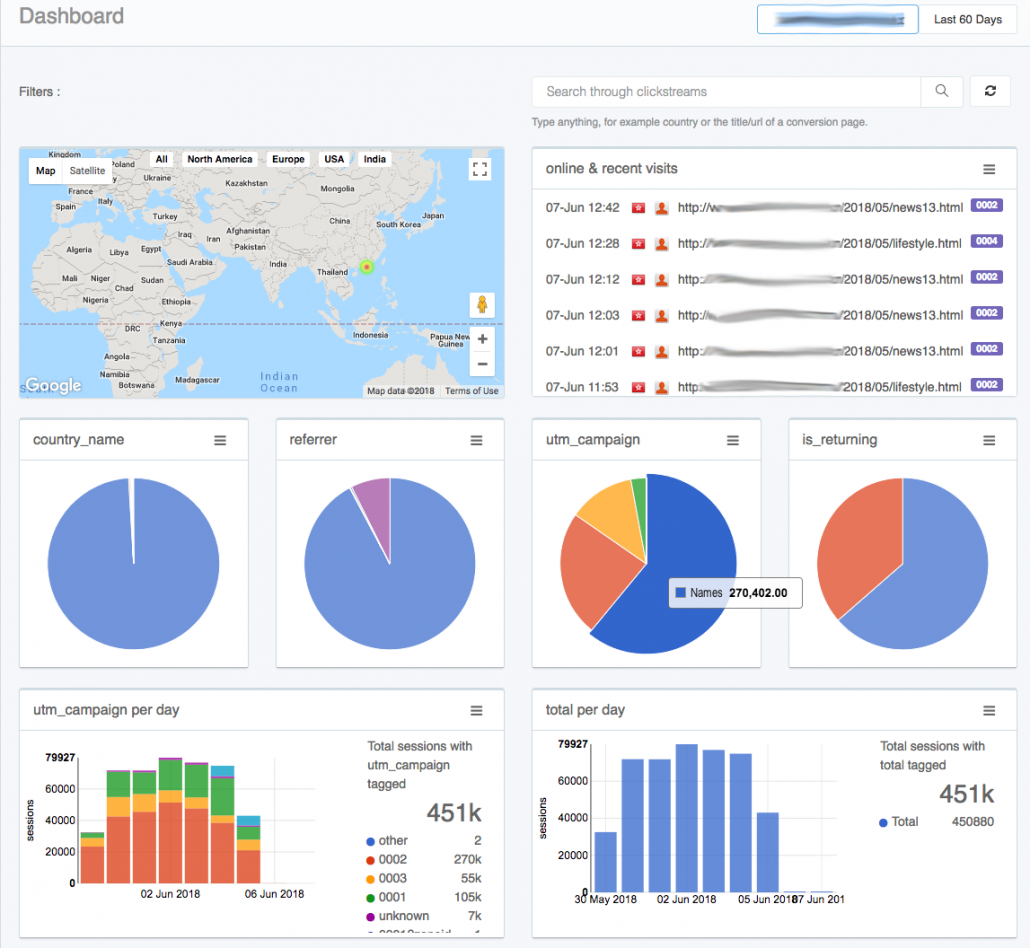
All metrics that start with utm_ will be tracked. This is a game changer.
If you have a metric that for instance tracks gender, you can use utm_gender=male in the url, and opentracker will make reports on this. The tool will allow you to analyse conversions based on gender. You can slice and dice the data with any metric you are sending.
Having the metric in the url, instead of the via a javascript, allows you to start using utm_ code with no setup communication needed between you and the developers.