

A detailed explanation of IP Tracking and IP Lookup. We present examples which demonstrate how tracing IPs with a geo location finder helps understand your website traffic and respond to your visitor needs.
Do you need to track IP address locations? That is a specialty of Opentracker, we have spent years engineering a reporting system that allows you to see the IP locations of visitors to your website.
Our reporting system derives the geolocation of all visits to your website, giving you a list of all ip address locations in a searchable database. We store associated clickstreams over long periods of time. This is interesting for a range of reasons, from increasing business to identifying click fraud.
Q: how does it work?
A: we use the IP address to geo-locate the visitor
Q: what does that mean?
A: pairing of an IP address to a geographical location is called geolocation.
Definition of geolocation: IP-based Geolocation is mapping an IP address to the real-world geographic location of an Internet-connected computer or mobile device. Geo-location involves mapping individual IP addresses to country, region (city), latitude/longitude, ISP, and domain name, among other useful things.
Q: what should I keep in mind?
A: Although it would be nice to be able to know the precise location of a visitor, it is not always possible to define the exact location of a host based on IP address.
Know exactly where your visitors come from.
Access highly detailed demographics at individual visitor level:
- Drill-down Geo-IP location data per visitor
- Study traffic from any location, at local, regional, state, or national level
What is included?
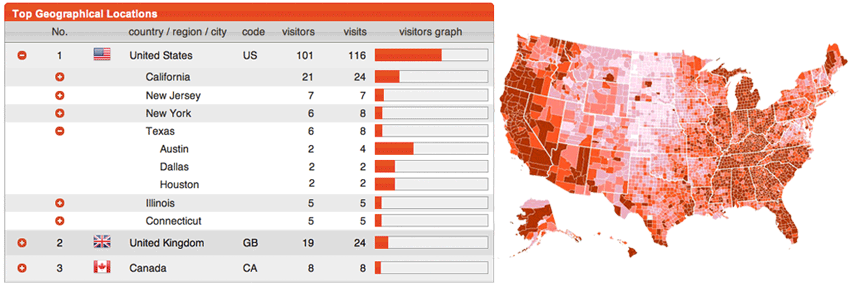
Standard visitor profile data include: IP Address, Country, Continent, Region, State, City, DMA, ZIP/ Postal Code, Telephone Area Code, Company, ISP & Organization
Reports include: Top Countries /Regions /Cities, Company Names, ISPs / Carriers, Area Codes, ZIP/ Postal Codes, (Sub) Continents
DMA = Direct Market Areas, used by various industries to plan marketing campaigns.
ZIP/postal codes: For US, Canada, and Europe we provide ZIP/ postal codes for the cities users are located in.
Intelligent and intuitive reporting interface
Drill down to individual visits per IP address – from bird’s eye down to granular. The interface that we have built allows you to drill-down from continent, and sub-continent, right down through state, city, etc., and generate pie charts for all data. This information is made available in separate reports and in a dashboard, for at-a-glance reporting. Segmentation per variable or metric is also available.
The Bottom line: delivering accurate IP-to-location data
We excel at incorporating IP Intelligence and geolocation technologies into website visit + engagement reporting.
Accuracy – Our IP geo-location data is the very accurate. We use multiple data sources based in the U.S. and the E.U. to pinpoint and cross-reference the location of your visitors. The insures that you get access to the best data available
Additional feature information
Opentracker derives location information from the IP address associated with each website visit. This gives you searchable geographic context alongside the visitor's clickstream and engagement history.
What Is IP-Based Geo Location?
IP-based geo location maps an internet-connected device's IP address to an estimated real-world area. Depending on the available data, this can include country, region, city, latitude and longitude, postal code, ISP, organisation, and domain information.
An IP address does not normally reveal a visitor's exact street address. Accuracy varies by network, provider, connection type, and location, so geographic results should be treated as useful estimates rather than precise GPS coordinates.

Know Where Your Visitors Come From
- View Geo-IP location data for individual visitors
- Study traffic at continental, national, regional, state, and city level
- Connect location details to complete visit and clickstream history
- Search and segment visitors using geographic fields
- Compare engagement and conversion activity across locations
Location and Network Details
Available visitor profile fields can include IP address, country, continent, region, state, city, designated market area, postal code, telephone area code, company, ISP, carrier, and organisation.
Summary reports group this information into rankings such as top countries, regions, cities, companies, ISPs, carriers, area codes, postal codes, and subcontinents.
Drill Down From Trends to Individual Visits
Start with a broad geographic report and drill down through region and city to the individual visits behind the numbers. Dashboard charts and report filters help you compare locations at a glance, while visitor profiles provide the detailed activity associated with each result.
How Businesses Use Geo-Location Data
- Understand which markets generate the most qualified traffic
- Tailor content, offers, and campaigns to regional demand
- Route enquiries to the appropriate local team
- Investigate unusual traffic patterns and possible click fraud
- Compare campaign results across countries and cities
Location Intelligence in Context
Geo-location becomes more useful when it is connected to visitor behaviour. Opentracker combines IP intelligence with pages viewed, referrals, campaign details, events, and conversions so you can understand not only where a visit came from, but what happened next.