
Track your visitors, click-by-click
 Our specialty. Best-of-breed real-time visitor reporting – track website visitors click-by-click.
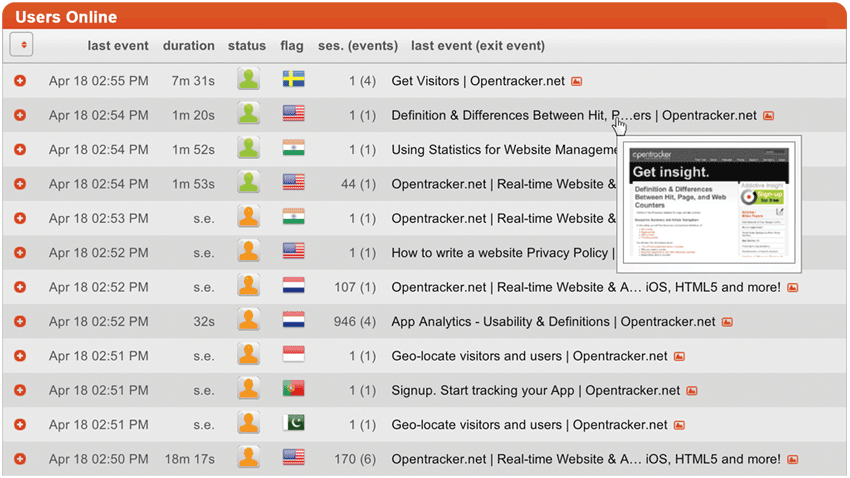
This is an interactive report showing visitor activity in real-time. The report is a clickable list of online & recent visitors to your site. Each individual is represented as an icon. By clicking on an icon you will see the full clickstream of the website visitor through your site, dating back to their first recorded visit.
You will also see complete Visitor Profiles. The profiles present full visit details, such as search term, company, all pages viewed through time, first recorded entry, and referrer info. Full technical details, such as ISP, browser, operating system (OS), etc, are also presented.
Use Opentracker to see who your visitors are, and exactly how they browse your site. Multiple interactive reports show you individual visitor activity in real-time. Trend reports fill in the bigger picture.
Events Profile
Every unique visitor is assigned a profile that contains a wide range of information including current and previous visit data, geo-location information, device specs, connection data, and much more.
You can also add custom data to user profiles and integrate your site visitors with additional info such as CRM, back office or shop databases.
Real visitors
We track & identify unique visitors, and do not annonimize this data, meaning you can search and zoom into each individual visit and the clicks they performed.
Key Features:
- Blazing fast
- Infinite scroll
- Column selector – choose what’s on your screen
- Clickstream preview – select clickstreams for bird’s eye view
- Calendar with date range
- Visual – thumbnail images of your site pages
- Options bar – customize your display
Online visitors

The visitors report displays each visitor is on a separate horizontal row with icons and summary data. There are numerous interactive page elements to drill down or get more information about your visitors.
For instance, you can expand each row to see the click-stream preview, or hover over visitors icons for profile information. There are visual aids such as geo-location maps and event thumbnails. By clicking on a visitor icon you drill-down to that visitor, loading a new report: visitor clickstream.
 Clickstream
Viewing any visitor, by clicking on their icon will give you that person’s full clcik- stream, dating back to their first referrer or landing page.
There are a series of default pieces of information which we display. Additionally, using our api you can add all kinds of pre-defined events and/or an unlimited number of custom events. There is no limit to the possibilities.
Visitor profile
User profiles present full user details, such as geo-location, company, all activity through time, first recorded entry, and session info. Full technical details, such as browser, device, platform, ISP, and operating system (OS) are also displayed.
The purpose of making individual visitor profiles available is to allow you to research for usage patterns, for example correlating specific behavior to technical details such as device type, session time , location or connection speed.